We are exactly nine days away from the release of Star Wars: Episode IX, marking the end of the Skywalker saga. Having just picked up a Disney+ membership, I found myself skimming through the prequels to fully immerse myself once again in the lore and backstory.
I watched Episode III in its entirety. It’s a very satisfying movie, however what intrigued me most in this watch-through was Padme’s death. I was always a bit confused as to why she died as a kid. I never really thought it was that well explained. In the intervening years since the movie was released, I’ve committed to a life in cardiology. I have new perspectives now, and I’ve learned a bit about human physiology. I think I may have some novel insights to provide. So, without further ado, here is my definitive take on Padme’s death.
Background events

Padme Amidala was a 27 year old human female from Naboo, according to this Star Wars wiki. She was born to a family of “modest origins,” but was quickly identified as being “gifted and brilliant,” leading to her selection to a legislative youth program, and ultimately her election as Queen. It’s clear from the imagery of the prequels that Naboo seems to be a vibrant planet with clean air, fresh water, and plenty of spaces for cardiovascular exercise.
From this we can surmise three things. First, that she likely did not have food scarcity as a child, and therefore did not have any nutritional deficiencies as a result of low vitamin intake such as iodine or vitamin B1 that can cause cardiomyopathies (thyrotoxicosis, beriberi). Second, that as a figure of political importance, she likely had regular checks with physicians who would monitor her blood pressure, cholesterol levels, and hemoglobin A1c. This would rule out fibromuscular dysplasia, familial hypercholesterolemia, and diabetes. Third, because of her intellect and good fortune to be born on such an abundant planet, she likely ate a balanced Naboo diet and got plenty of exercise. Overall: she was likely healthy with no past medical history.
After she is elected to the Senate, she moves to Coruscant. Her stress levels likely go way up as she is dealing with a multi-front war, a co-senator/chancellor from Naboo who turns out to be a Sith lord, and a forbidden romance with a Jedi. The last item here turns out to be the most relevant. Padme spends most of Episode III ruminating about how things are falling apart with Anakin, who is acting increasingly bizarrely. After Anakin betrays the Jedi and becomes Darth Vader, Obi-wan confronts Padme with evidence that Anakin has been slaughtering Jedi, including a room full of Younglings. She is visibly shaken but insists on flying to Mustafar to confront Anakin. Medically, this is where things really pick up.
Confrontation on Mustafar
Padme pleads with Anakin, who is fully bonkers at this point:
Padmé: I don’t believe what I’m hearing. Obi-Wan was right… you’ve changed. You have turned to the dark side. You’re not Anakin anymore.
Anakin: [with a growing angry look and voice] I don’t want to hear any more about Obi-Wan. The Jedi turned against me. Don’t you turn against me!
Padmé: [crying] Anakin, you’re breaking my heart. You’re going down a path I cannot follow!
Anakin: Because of Obi-Wan?
Padmé: Because of what you’ve done… what you plan to do! Stop, stop now. Come back. I love you!
Anakin: [enraged and paranoid] LIAR! [Anakin looks beside Padme and sees Obi-Wan standing at the ship’s exit overhearing them]
Padmé: No!
Anakin: You are with him! You brought him here to kill me! [Begins Force-choking Padmé]
Padmé: No!
Obi-Wan: Let her go, Anakin!
Padmé: Anakin…Obi-Wan: Let… her… go![Vader releases Padmé, who collapses]
We’ll return to this later, but the main clues are “Anakin, you’re breaking my heart,” and the fact that she is force-choked and then loses consciousness.
Aftermath and Death on Polis Massa

Padme gives birth on Polis Massa, an Asteroid Field in the Outer Rim, two days after being choked by her husband. Polis Massa is an extremely remote location, so remote that is a safe haven for the few remaining Jedi from the Empire. Think Degobah levels of remote. As such, I think it’s safe to assume that their medical facilities are not top-of-the-line. This is basically a research station, and probably had the bare minimum of medical equipment. After taking Padme to the medical center, Obi-Wan and Bail Organa hear a baffling piece of news from the medical droid, and in short order, she’s dead. What the hell happened? I have the full exchange below:
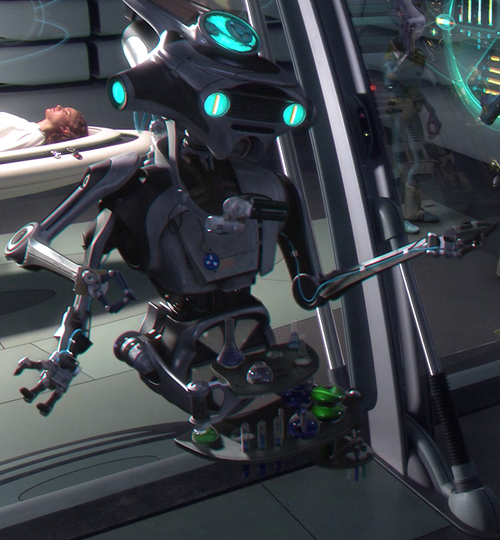
MEDICAL DROID: Medically, she is completely healthy. For reasons we can’t explain, we are losing her.
OBI-WAN: She’s dying?
MEDICAL DROID: We don’t know why. She has lost the will to live. We need to operate quickly if we are to save the babies.
* * *
OBI-WAN: Don’t give up, Padme.
PADME winces from the pain. The MEDICAL DROID is holding the BABY.
MEDICAL DROID: It’s a boy.
PADME: Luke . . .
PADME can only offer up a faint smile. She struggles to touch the baby on the forehead.
MEDICAL DROID: … and a girl.
PADME: . . . Leia.
* * *
OBI-WAN: You have twins, Padme. They need you . . . hang on.
PADME: I can’t . . .
PADME winces again and takes OBI-WAN‘s hand. She is holding Anakin’s japor snippet.
OBI-WAN: Save your energy.
PADME: Obi-Wan . . . there . . . is good in him. I know there is … still . . .
A last gasp, and she dies.
What We Know
OK, so let’s go back to the beginning of the sequence — the extreme emotional trauma that her husband and baby daddy Anakin is a murderous psychopath. Padme says “Anakin, you’re breaking my heart!” I believe that this line carries a lot of significance. Not only is she referring to her emotional state, I believe she is also referring to physical chest discomfort.
Next, she gets force choked. Permanent hypoxic brain injury occurs when the brain goes without oxygen for more than 4 minutes. The force choke seems to be well-aimed and is likely impeding air flow through the trachea, but it lasts only about 30 seconds. Padme passes out after being released, but I do not believe her death had much to do with the force choke. Sure, it was extremely traumatizing. But we have a few clues that tell us the damage from it was minimal.

Most importantly, her ability to communicate meaningfully with Obi-Wan in the delivery room says a lot. We can assume that from a neurological standpoint she is basically intact, although she might be a bit disoriented. She knows who he is, she remembers how to speak, she remembers Anakin, etc. So brain function is basically OK. Furthermore, her ability to phonate speaks (pun intended) to no lasting damage to her larynx from the force choke. And based on the medical droid’s assessment that “medically, she is completely healthy,” I don’t believe there was any structural damage to her neck and the surrounding tissue and organs.

One thing the force choke almost certainly did was raise central venous pressure. This would increase the demand on the left and right ventricles, as well as activate baroreceptors in the vagus nerve which can cause bradycardia and syncope, which could explain why she passed out. But I also can attribute this to the pure shock of the situation, so vasovagal syncope could be a culprit here as well.
At this point, she is unconscious on the surface of a hot lava planet. She is pregnant with twins, and therefore her total body volume is high. But she is likely relatively hypovolemic at this point. She isn’t taking in any PO fluids, and in addition she’s likely quite dehydrated from insensible losses to the environment. Eventually, Obi-Wan gets her and brings her to Pollis Massa, which brings us to the medical droid’s strange report.
“Medically, she is completely healthy. For reasons we can’t explain, we’re losing her.” What does it mean by this? Let’s take stock.

Padme is lying flat. There seems to be a screen with diagnostics, probably trended vitals. There are no central lines in her neck or groin, no intravenous lines, no bags of inotropes… nothing. It’s unclear what, if any, labs have been drawn. In fact, there seems to have been no invasive monitoring or intervention done at all. So I don’t know what the medical droid is referring to by “medically” here. My best guess is that it’s probably referring to some method of advanced imaging like a CT scan or MRI. Normal imaging would rule out a lot of major things like tension pneumothorax, pulmonary embolism, and large pericardial effusion causing cardiac tamponade (these things could also be picked up on exam, but I’m assuming the med droid has a decent exam). Also, as I alluded to earlier, it would rule out traumatic injury from the force choke: broken bones, penetrating trauma, vascular injury, and hematoma. It also rules out necrosis from a large scale burn injury, although, again, this would have been evident on exam. Lastly, it greatly reduces the likelihood that there are active issues with her pregnancy – it rules out intrauterine hemorrhage, and likely shows two healthy babies. The medical droid probably would have been alerted to something like placenta previa, which would have been picked up on imaging and made it a high risk pregnancy. In that case they probably would have gone right to C-section.
It’s hard to image the coronaries like this – you need a detailed coronary CT protocol that involves breath holding and a slow heart rate – but let’s assume that they have the technology. If it showed normal coronaries, this would have really confused the medical droid. Given that Padme is a young pregnant female who was found down, the med droid could have reasonably thought this was a case of Spontaneous Coronary Artery Dissection, or SCAD. Gold standard to diagnose would be angiography, but I’ll assume that their advanced imaging could detect this. With normal coronary anatomy, that is ruled out, as is myocardial infarction.
So the imaging is normal, and the medical droid relays this info to Obi-Wan. So why did the medical droid report that they were losing her? I’m guessing it’s because her vitals were likely normal-ish but heading in the wrong direction. Probably her oxygen saturation and blood pressure were low-normal, BP 90s/60s and oxygen saturation in the low 90s, but continuously trending downwards. So the droid knew something was up, but didn’t quite know what.
Putting It Together
We have a force choke that we know did not cause brain damage and based on normal imaging did not cause any blunt force crush injuries to her internal organs. We have normal imaging and likely no labs or invasive monitoring of left and right sided pressures and cardiac output based on her absence of any IV or central lines. We have dehydrated (low intravascular volume) but overall hypervolemic (high extravascular volume) woman with twins. Even though her overall plasma volume was likely elevated from the pregnancy, she probably had a low intraarterial volume.
What didn’t the medical droid know? It didn’t know the history. It didn’t know the severe stress she had been under. Critically, due to a lack of modern medical facilities, it appears that it did not have any real-time imaging of the heart, only snapshots with MRI and CT. Ladies and gentlemen, I give you my diagnosis:
I think Padme died from an underlying undiagnosed Takatsubo cardiomyopathy as a result of her being force choked. Takatsubo cardiomyopathy is also known as stress-induced cardiomyopathy, or “broken-heart syndrome.” Takatsubo is the japanese word for a fishing pot used to trap octopuses. Its shape is very similar to the heart’s shape in this condition – a ballooning at the apex with preservation of the mid and basal segments.

The pathophysiology is unknown to this day. Patients typically present with chest discomfort after severe emotional stress. They have electrocardiogram changes consistent with myocardial infarction and are urgently taken to the cardiac catheterization lab, where they are found to have normal coronaries. Left ventriculography (shooting dye into the left ventricle to define it’s shape, as seen above) shows the typical Takatsubo pattern, and the diagnosis is made. Patients often have a very good prognosis, and are treated with beta blockers and ACE inhibitors. Most will fully recover their left ventricular function, however acutely patients can lose up to half of their heart’s pumping capabilities, or cardiac output.
Normally, this type of thing is survivable, but Padme is not in a normal situation. She is hypervolemic from carrying twins, and underwent severe physiologic stress between the choke and lying around on Mustafar for what must have been hours. She therefore was likely in a state of undiagnosed cardiogenic shock. A simple venous lactate or troponin-I level would have been able to point the medical droid in the right direction. An EKG would have helped as well, however due to the time that elapsed between event and presentation, the acute ST changes may have resolved, and the only thing left would have been nonspecific T wave changes. With no prior EKG, the medical droid may have been left in the lurch even if he did have an EKG.
Padme now goes into labor with a greatly reduced cardiac output. This is an extremely dangerous condition, as delivery is one of the greatest physiologic stressors there are on the body. Even women with normal hearts can develop peripartum cardiomyopathy, a brutal condition which carries a very high mortality. Forget heart issues – out of hospital maternal mortality from normal child birth is quite high.
Now, what exactly killed Padme? This is less certain to me. She names her son, then her daughter, then has a brief conversation with Obi-Wan before dying. It’s possible that her elevated left sided pressures from the Takatsubo cardiomyopathy caused flash pulmonary edema. Because she was lying completely flat, she would have had worsening fluid buildup in her lungs which would have caused her oxygen saturation to plummet, causing her to become hypoxic and drift into unconsciousness and ultimately losing her brainstem reflex to breathe. This is, I think, the most likely explanation.
Other possibilities include hypovolemic shock and and circulatory arrest from extreme fluid loss after delivering her twins and being left alone on Mustafar for so long. Ventricular arrhythmia is possible given the severe electrolyte abnormalities from her fluid shifts from pregnancy and dehydration, although I suspect her presentation would have been more dramatic and wouldn’t have had such a slow-burn feel to it. We also have to consider things like amniotic fluid embolus or a new, massive pulmonary embolus that wasn’t present on initial imaging that occurred during childbirth causing hypotension, shock, and death.
What I’m fairly confident about is that the Takatsubo cardiomyopathy greatly weakened her, making what was an already high risk pregnancy extremely risky, weakening her and opening her up to a range of fatal pathologies all stemming from greatly reduced cardiac output. It’s hard to blame the medical droid entirely – I think it was doing its best. But it was probably used to minor scrapes, headaches, the flu, and the occasional broken bone from a mining accident. With limited diagnostics, it just couldn’t get a handle on what was a fairly complex case. I think the obstetrics/pediatrics droid performed very well. Clearly, the babies ended up being fine. They ended up being very close.

Almost certainly, limited medical resources played a large role in Padme’s death, as basic labs, an echocardiogram, and/or invasive hemodynamic monitoring could all have been used to hone in on the correct diagnosis. But this was a remote base in an asteroid field. It is doubtful there was much else besides the two droids and the monitor screen, which was probably a glorified EMR. That the Joint Commission would ever travel that far for inspections, much less recognize it as a Center of Excellence for Advanced Cardiac Therapies, is similarly doubtful.
Additionally, one wonders what the channels of communication were between the two droids. Could the droids understand eachother? The obstetrics droid did not appear to speak English, and the medical droid did. I’m not sure if it was the culture of the institution to have the medical droid assume all diagnostic responsibility, or if this was shared. Limited communication may have been a factor – the two droids are never shown talking to one another. Perhaps if they spoke a similar language, the delivery droid could have assisted in pointing the medical droid in the right direction (ie heart failure) given its expertise in maternal/fetal medicine.

The Final Chapter
Thank you for going on this long journey with me. Hopefully you learned something, either about heart physiology or octopus jars or my bizarre obsession with Star Wars. Anyway, I’m very excited for The Rise of Skywalker, and oddly sentimental that the journey is finally over. Here’s waving goodbye to our favorite space family. Thanks George Lucas/Disney for the drama, the music, the lightsaber battles, the ships, the wisdom, and the amazing prequels dialogue… and one particularly interesting and enduring medical mystery.